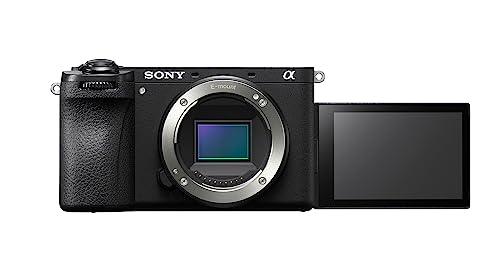
Choosing a camera for video means shopping by video priorities, not photo ones. Favour reliable, smooth autofocus and effective stabilization. Pick 4K, plus high frame rates if you want slow motion. For vlogging, get a screen that flips to face you. Do not underestimate audio and battery life, which make or break real shoots.
Video is different from photography
The first thing to grasp is that choosing a camera for video differs from choosing one for photos, because video stresses different capabilities. A camera can shoot beautiful stills yet feel awkward for video, and the reverse holds too, so shop with video priorities rather than assuming the best photo camera wins. For video, several things matter enormously: resolution and frame rate options, how smoothly the autofocus tracks a moving subject, how the camera handles heat over long recordings, audio input options, and how it performs when you film yourself. Some barely register for stills. Creators also have practical needs photographers may not, such as a screen that flips to face you for vlogging, long battery life for long shoots, and a manageable size for filming on the move. None of this demands the top-end cinema camera. It does mean weighing the features that actually affect your video, rather than following photo-focused reviews or spec sheets. Approach the choice through a video lens, and you land on a camera that is genuinely good for the content you want to make.
Resolution, frame rates and image quality
The core video specs to understand are resolution and frame rate, since together they define your footage. Resolution, most commonly 4K today, sets the detail. 4K has become the sensible standard, giving sharp footage and room to crop or reframe while still delivering high-definition output. Frame rate shapes both how motion looks and slow motion. Standard frame rates give natural motion, while higher rates like 60p, 120p, or beyond let you slow footage down smoothly, so if slow motion appeals, look for high-frame-rate options. Beyond the numbers, image quality features like colour depth affect how much you can edit and grade. 10-bit colour gives far more flexibility than 8-bit, and some cameras oversample, drawing on more sensor data than the final resolution for extra sharpness. A capable hybrid camera like the Sony a6700, offering oversampled 4K, 10-bit colour, and high-frame-rate options, shows the kind of feature set that suits serious video work. Match resolution and frame rate to what you actually make, since higher-end options also mean bigger files, and you have the foundation of good video.
Autofocus, stabilization and filming yourself
For video, and especially vlogging and solo content, some practical features outrank raw image specs. Autofocus sits near the top. Video autofocus must smoothly and reliably keep a moving subject sharp, and increasingly it tracks faces and eyes automatically, which is invaluable when you film yourself and cannot check focus, or follow an active subject. Look for a camera known for confident, smooth video autofocus rather than one that hunts and jumps. Stabilization comes next, since handheld video shows every shake. In-body stabilization or good lens stabilization keeps footage steady, especially while walking and vlogging, though a gimbal or tripod still helps for the smoothest results. Filming yourself? A flip-out or fully articulating screen that faces forward is genuinely important, letting you see yourself to check framing and focus while recording, which is why it headlines vlogging cameras. Consider too how easily the camera works one-handed and on the move. These usability features, smooth autofocus, effective stabilization, and a screen you can see while filming yourself, often make more daily difference to a creator than small gaps in image specs.
Audio, battery and practical realities
Some of the most important video factors are the practical ones spec sheets underplay, and audio leads them. Viewers forgive imperfect video far more readily than bad audio, so how a camera handles sound matters. Look for a microphone input so you can attach an external microphone, since built-in camera microphones rarely sound professional. Consider a headphone output for monitoring. Battery life and heat come next, because video drains batteries far faster than stills, and some cameras overheat and stop during long recordings. If you shoot long takes, check real-world recording limits and plan for spare batteries or external power. Storage matters too, since high-quality video fills memory cards quickly and needs fast cards to record smoothly, plus a capable computer to edit. Think about connectivity for transferring and live streaming if you need it, and overall size and weight for how you actually shoot. These unglamorous realities, especially good external audio and dependable battery life, often separate a camera that is pleasant to create with from one that frustrates you, so give them real weight alongside the headline image features.
Matching the camera to your content and needs
Finally, the right camera depends on the content you make and a sensible plan, so match your choice to real needs rather than the highest specs. Think honestly about your content. A talking-head YouTuber or vlogger needs different things from someone shooting cinematic shorts, product videos, or fast action, so prioritize the features that serve your style, whether that is a forward-facing screen and great autofocus for vlogging, high frame rates for action, or maximum image quality for cinematic work. Decide whether you want a dedicated camera or a hybrid that handles both photos and video well, since many creators value one camera for everything. Remember that lenses and accessories, a good microphone, stabilizer, spare batteries, and fast cards, are part of the real setup and often improve results more than a fancier body. You do not need the most advanced camera to make great content, since capable, creator-friendly cameras exist at many levels, and skill in framing, lighting, and editing matters more than gear. Define what you make, prioritize the video features that serve it, plan for the whole setup, and you will choose a camera that genuinely helps you create rather than one bought for specs you will never use.
The bottom line
Choosing a camera for video, vlogging, and YouTube is straightforward once you shop with video priorities rather than photo ones. Accept that video stresses different things. Then weigh the core specs of resolution and frame rate, favouring 4K and, if you want slow motion, high frame rates, along with colour depth for editing flexibility. Give real weight to the practical creator features: smooth reliable autofocus, effective stabilization, and a screen that faces you for filming yourself. Do not underestimate audio and battery life, which make or break real shoots. Finally, match the camera to the content you actually make, and plan for the whole setup, including a microphone and accessories. Do that, and you will end up with a camera that fits your creative work and helps you make better video, which is what the right tool is really for.
Note: Availability and specifications change often. Always confirm the current details on Amazon before buying.