Home ›
Baby & Kids › Why a Baby Monitor's Zoom Runs Out Before Its Sensor Does
Baby & Kids
Why a Baby Monitor's Zoom Runs Out Before Its Sensor Does
PBy the Pickpedia Team·5 picks compared·Last verified October 2026
Affiliate disclosure: As an Amazon Associate, Pickpedia earns from qualifying purchases. Links on this page are paid links, and we may earn a commission at no extra cost to you. This never affects our picks or scores.
This page contains affiliate links. If you buy through one we may earn a
commission, at no cost to you.
Resolution is the feature every listing leads with, and on a monitor with a screen in the box it
is close to the least important thing on the page. Not because the number is dishonest. Because the
screen in your hand cannot pass it on.
There is a version of the resolution figure that matters a great deal, though, and it is the
version nobody puts on the front: how far the camera can be zoomed before it runs
out. That has an exact answer, it is different for every monitor, and you can compute it from two
numbers the box already gives you.
Start at the eye, because that is the narrow end
A picture has to get through three things in order: a sensor, a screen, and the person looking at
the screen. The one that limits the result is the smallest of the three, and on a handheld parent
unit it is the person.
Take the most common parent unit in this catalogue, a 5 inch screen. In a 16 by 9 shape, a 5 inch
diagonal is 110.69 millimetres wide and 62.26 tall. A healthy eye separates detail
down to roughly one arcminute, which is 2.909 ten thousandths of a radian. Hold that panel 400
millimetres away, about where a hand rests it on a lap or a nightstand, and it subtends 0.27673
radians. Divide: 951 resolvable elements across the whole panel. That is the budget,
and nothing downstream of your retina can spend more of it.
Now put real panels in it. A 720p screen of that size is 293.7 pixels per inch. The eye at 400
millimetres can use 218.3. So a 720p handheld is already 1.35 times finer than you
can see. A 2K panel of the same size is 587.4 pixels per inch, which is 2.69 times the
usable figure, and you would have to bring it to 149 millimetres from your eye,
closer than most people can focus comfortably, before its pixel grid resolved at all.
Which settles the thing the question was really asking. Between two monitors with the same screen
size, the difference in panel resolution is invisible at normal holding distance,
and the difference in camera resolution cannot get past the panel. So where does a bigger sensor
actually go?
A 5 inch panel at arm's length can
hand the eye about 951 elements across, so a camera's extra columns reach a viewer only through the
zoom. Every monitor here publishes a maximum zoom between 1.49 and 2.07 times the factor at which its
own sensor runs out, and the better sensors really do buy more usable zoom.
The zoom is the only route from a sensor pixel to your eye
A digital zoom does not magnify anything. It throws most of the frame away and stretches what is
left across the whole screen. At a zoom factor of z, the columns you are looking at are the camera's
column count divided by z.
So the camera stops being able to fill the eye's 951 elements at exactly the point where its
columns divided by z fall below 951, and that crossover factor is the camera's column count
divided by 951. Past it, you are enlarging pixels. Short of it, you are genuinely resolving
more of the room.
Work it for the four monitors in this catalogue that publish both numbers, and the pattern is
remarkably consistent:
A 720p camera has 1280 columns and crosses over at 1.346. A 1080p camera has 1920
and crosses at 2.019. A 2K camera has 2560 and crosses at 2.692. A
4K camera has 3840, and viewed on a phone at 300 millimetres where the eye can use 1322 elements, it
crosses at 2.905.
Against the maximum zoom each one actually publishes: 2x, 4x, 5x and 6X. The ratios are
1.486, 1.981, 1.857 and 2.065. Every single one offers a top zoom between
1.49 and 2.07 times the factor at which its own sensor gives up.
And here is the part that redeems the resolution number rather than debunking it. The
order is preserved. The 720p camera gives you 1.35 usable zoom factors, the 4K one gives
you 2.9. A better sensor really does buy more, and this is the only mechanism by which it does. The
headline figure is doing all its work in the zoom and almost none in the ordinary wide shot.
One listing sells both halves of its own mismatch
An
AI video baby monitor with a pan tilt
camera and a 5 inch screen publishes, as two separate selling points, a 5 inch 2K parent
unit and a 1080p camera. It adds 355 degrees of pan, 45 of tilt, a 2 to 4
times zoom, both no Wi-Fi and app modes, seven brightness levels, a charging dock, invisible infrared
night vision, lullabies, feeding reminders, temperature and humidity readings, microSD to 256GB, and
a stated 1000 foot range.
Put the two resolution figures in the same sentence and they disagree. 2560 by 1440 is
3,686,400 panel pixels. 1920 by 1080 is 2,073,600 camera pixels.
The ratio is 1.7778, so 43.75 percent of that panel's pixels are carrying interpolated data
at every moment. The screen out-resolves the camera that feeds it, by a wide margin, and
both numbers appear in the listing as advantages.
Then its zoom. Its crossover is 2.019 and its published range is 2 to 4 times. So
the range begins within one percent of the point where its own sensor runs out, and
ends at twice that point. At 2x it hands the eye 960 columns against a budget of 951, which
is as exactly matched as a specification gets by accident. At 4x it hands over 480, and the eye is
capable of twice what arrives.
None of which makes it a bad monitor, and the dual mode is a genuinely useful thing that no amount
of resolution substitutes for. It is just that the two numbers on the front are the two numbers least
worth comparing. The record is in our
review of the
ALIOBC monitor, and the band its private link shares with your microwave oven is the subject of
what actually interferes with a baby monitor,
which quotes the same specification line for a completely different argument.
The 720p monitor whose own drawback is true of the file and not the picture
A
5 inch 720P monitor with no Wi-Fi at
all runs a private frequency hopping link to its own handheld screen, with 350 degrees of pan,
108 of tilt, 2x zoom, two way talk, sound activated alerts, four lullabies, temperature alerts at
95F and 32F, a 3,000 milliamp hour battery rated 24 hours in standby or 12 with the screen on, and a
stated 2,000 foot open area range.
Its own drawbacks field says "720P is softer than 2K and 4K WiFi cameras". That is
true of the recording and not of the viewing. At 400 millimetres its 1280 columns
against the eye's 951 means 74.3 percent of its camera columns are reaching you, which is a higher
share than the 1080p monitor above manages, because the sensor and the panel match. The place it
genuinely gives something up is the zoom: it crosses over at 1.346 and offers 2x, so its modest zoom
is already 1.49 times past its own ceiling.
An
Ognee monitor with a 2K camera and a
built in 32GB card publishes continuous 24 hour recording and playback, 350 degree rotation, 5x
zoom, night vision, cry and fence alerts with a trigger interval up to 30 seconds, physical buttons
for volume and zoom, a direct encrypted link with no internet, and a 6000 milliamp hour battery.
Its 2560 columns cross over at 2.692, so its published 5x is 1.86 times past the point. At 5x the
crop is 512 columns wide, which is fewer columns than the 720p monitor above sends at no zoom
at all. That is the cleanest way to state what empty magnification costs: the most zoomed
view on the better camera is coarser than the plain view on the worse one.
And the figure that would settle this properly is missing. Its record publishes a 5x zoom, a 2K
sensor, a 32GB card and a 6000 milliamp hour battery, and no screen size. The
crossover above therefore assumes the same 5 inch panel as its siblings. Full record in our
review of the Ognee monitor.
Two records whose number pairs actually agree, which is worth saying
A
4K smart Wi-Fi monitor with an 8MP
sensor and 6X zoom publishes 950 nanometre infrared, dual band Wi-Fi, a 350 degree non-contact
mount, seven detection features and no subscription tier. Check its pair: 3840 by 2160 is
8.294 megapixels. "4K" and "8MP" are the same claim stated twice, correctly.
No defect, and it is the only monitor here whose published zoom is backed by enough sensor to make
roughly half of it real.
It also has no screen of its own, which is why its crossover above uses a phone at 300
millimetres. Its own drawbacks field makes the right point and understates it: "4K clarity depends on
WiFi and all specs are maker-stated". It depends on the viewing device at least as
much as on the network, and a phone at arm's length lets the eye use about 1322 elements against the
camera's 3840, so 34.4 percent of the sensor's width survives the trip even before the zoom. See our
review of the Monai Pro.
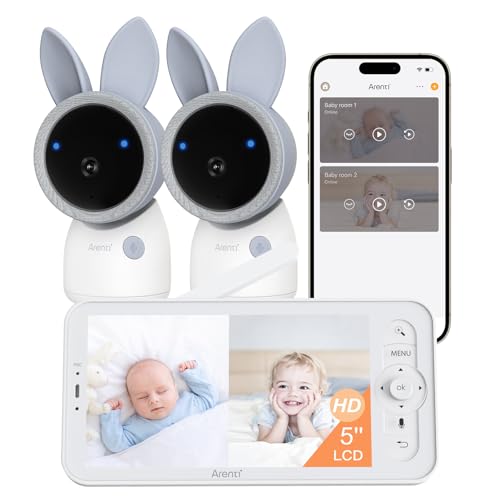
The second pair that closes. An
ARENTI A4 with two cameras and 2.5K
Wi-Fi publishes 4MP per camera, 355 degrees of pan, 60 of tilt, dual band Wi-Fi or a no Wi-Fi
parent unit, split screen viewing, an RGB night light, full duplex audio and AES-128 encryption. The
standard 4MP sensor format is 2688 by 1520, which is 4.086 megapixels with a 2688 pixel long side,
and "2.5K" is a fair label for a 2688 wide frame. Those reconcile.
Its split screen is where the arithmetic bites, though, and it is nobody's fault. Two feeds side
by side on one 5 inch panel gives each one 55.35 millimetres of width, which at 400 millimetres is
476 elements per camera, or 17.7 percent of each sensor's 2688 columns. A two camera
system is the one case where the panel, not the eye, becomes the part that decides the result. Details in
our review of the ARENTI A4,
and the screen against app decision is covered in
how to choose between a screen and
app baby monitor.
Why this is the same trap as a projector, in a different order
Our page on
how to choose a
projector states the principle exactly right for one device: "A native 1080p projector that
supports 4K does not show a 4K image." Supported resolution is what the input accepts. Native
resolution is what the pixels are.
A baby monitor is the same trap with an extra link. It has a native resolution at the camera, a
native resolution at the screen, and a human being at the end, and all three are different numbers.
A projector sells you one device's two numbers. A monitor with a screen in the box sells you
two devices' numbers and never multiplies them together. The one that binds on a handheld is
almost always the third, which appears on no box anywhere.
What follows practically is short. If the monitor comes with a screen, buy the screen size and the
camera's movement, because pan, tilt and zoom range change what you can see and panel resolution does
not. If you will view it on a phone, the sensor does more of the work, because a phone gives the eye more
elements to work with. Either way, read the zoom against the sensor: a 5x on 2K and a 2x on 720p are
both past their ceilings, and the one that is not is the 6X on 4K, roughly halfway.
The honest limit, and three things deliberately left alone
What is exact: all the pixel products, the panel geometry derived from a 5 inch 16:9 diagonal, the
1.7778 ratio between the 2K panel and the 1080p camera, the 43.75 percent that follows from it, and
every crossover division. Those do not depend on any judgement.
What is representative rather than published. The one arcminute acuity figure is
the standard value for a healthy eye on a high contrast target, and it is generous: on a dim
infrared image real acuity is substantially worse, which only strengthens the conclusion. The
400 millimetre handheld distance and 300 millimetre phone distance
are typical rather than measured, and every element count scales linearly with them, so sit twice as
far away and every crossover halves. The 16:9 shape of the 5 inch panels is assumed, because no record
states an aspect ratio. The readings of "2K" as 2560 by 1440, "4K" as 3840 by 2160 and "4MP" as 2688
by 1520 are label conventions rather than published grids.
And the real gap, which no amount of care closes. Not one of these five records publishes
a field of view. Without it there is no way to turn columns into detail per inch of crib,
which is the quantity an owner actually wants, and a wide angle lens spends its columns on walls.
Naming that is more useful than inventing an angle, so this page stays in elements across a frame and
never claims a figure about a baby.
Three things not computed. Night vision resolution, because an infrared image uses
the same pixel grid at a far lower signal to noise ratio, and resolution under noise is not a pixel
count; treating it as one would flatter every camera here. Anything about what a monitor lets
a parent notice about a sleeping child, which is a question about an infant and not about
optics, and is not a question arithmetic should be allowed near. And the link bit rate
behind these resolutions, which is a real constraint on a wireless camera and belongs on its own page;
the cable version of that sum is in
why a monitor goes black when you
raise the refresh rate.
Three numbers to carry. A 5 inch screen at arm's length hands the eye about 951
elements across, so panel resolution beyond 720p at that size is invisible. A camera's
columns divided by 951 is the zoom factor where its sensor runs out, which is 1.35
on 720p and 2.90 on 4K. And every monitor here publishes a top zoom between 1.49 and 2.07
times that factor, so the back half of every zoom range on the market is enlargement rather
than detail.
Why a Baby Monitor's Zoom Runs Out Before Its Sensor Does at a glance
ARENTI A4 Baby Monitor with 2 Cameras and 2.5K WiFi
parents monitoring twins, siblings, or two rooms at once
Two 4MP cameras with split-screen
microSD card not included
Why you can trust this guide
We compared these picks using verified manufacturer specifications, current retailer listings, and patterns in owner feedback, alongside editorial research. We focus on measurable differences such as performance, capacity, usability, and build quality. Pickpedia does not present editorial research as laboratory testing, and we do not claim hands-on testing unless it was actually performed.
Best for parents wanting an active pan-tilt camera with local and remote modes
8.6/ 10 Pickpedia editorial score
The ALIOBC baby monitor works locally without WiFi or remotely through the app. It suits parents wanting privacy at home and remote checks away. The maker lists a 5-inch 2K parent unit with 1000ft range, a 1080p pan-tilt-zoom camera, AI cry and motion detection, two-way talk, invisible night vision, a charging dock, and microSD support up to 256GB.
Best for parents who want private, app-free monitoring on a dedicated screen
8.2/ 10 Pickpedia editorial score
This baby monitor skips WiFi entirely, using a private FHSS direct link to a 5-inch 720P parent screen. Open-area range is rated up to 2,000 feet. It offers remote 350 degree pan, 108 degree tilt, 2x zoom, two-way talk, VOX sound alerts, four lullabies, and temperature alerts. The 3,000mAh parent unit lasts up to 24 hours in standby.
Best for privacy-minded parents who want continuous recording and playback
8.4/ 10 Pickpedia editorial score
The Ognee baby monitor pairs a 2K camera with a built-in 32GB card for 24/7 continuous recording and playback. It connects through a direct encrypted link with no WiFi, internet, or cloud, so there are no subscriptions. Features include 350 degree pan and tilt, 5x zoom, night vision, cry and fence alerts, and a 6000mAh battery with physical button controls.
Resolution2K Ultra HD (stated)
Recording24/7 continuous playback
StorageBuilt-in 32GB card
ConnectionDirect encrypted, no WiFi
Pan / tilt350 degrees
Zoom5x magnification
Battery6000mAh
AlertsCry and fence, adjustable interval
Pros
Built-in 32GB card enables 24/7 recording and playback
Stated 2K video with clear night vision
Direct encrypted link with no WiFi or subscription
350 degree pan and tilt with 5x zoom
6000mAh battery for extended use
Physical buttons make night adjustments easy
Cons
32GB overwrites older footage during continuous recording
No remote viewing away from home by design
All specs are maker-stated, not lab-verified
Real battery runtime varies with screen and movement
Best for parents wanting an all-in-one 4K smart monitor without monthly fees
8.8/ 10 Pickpedia editorial score
Monai Pro is a ready-to-use 4K smart baby monitor combining an 8MP 6X zoom camera, flexible crib mount, and app control. Dual-band WiFi aims to keep the feed stable, while 950nm night vision reduces red glow. Seven AI features cover cry detection, sleep tracking, covered-face and danger-zone alerts, auto tracking, and moment capture, all without subscription tiers.
Resolution4K 8MP (stated)
Zoom6X
WiFiDual-band 2.4GHz / 5GHz
Night vision950nm invisible infrared
StorageBuilt-in 32GB local
AI features7 included, no fee
Mount350 degree non-contact
UsersUp to 5 shared
Pros
Ready-to-use 4K system with camera, mount, and app
Best for parents monitoring twins, siblings, or two rooms at once
8.8/ 10 Pickpedia editorial score
The ARENTI A4 is a two-camera baby monitor built for watching more than one room. Each camera shoots 4MP HD video with 355-degree pan and 60-degree tilt, and the system runs on dual-band 2.4GHz and 5GHz Wi-Fi or a no-Wi-Fi parent unit. Split-screen viewing shows both feeds at once. Extras include an RGB night light, two-way talk, and AES-128 encryption.